Tips and Tricks HQ Support

Support site for Tips and Tricks HQ premium products

  • Home
  • Contact Us
  • Documentation
  • Forum Home
    • Forum
    • Forum Search
    • Forum Login
    • Forum Registration

Reply To: WP eMember Form Builder Addon – how to add LINK to checkbox – options field?

by

Tips and Tricks HQ Support Portal › Forums › WP eStore Forum › WP eStore General Questions › WP eMember Form Builder Addon – how to add LINK to checkbox – options field? › Reply To: WP eMember Form Builder Addon – how to add LINK to checkbox – options field?

May 29, 2021 at 9:50 pm #83080
admin
Keymaster

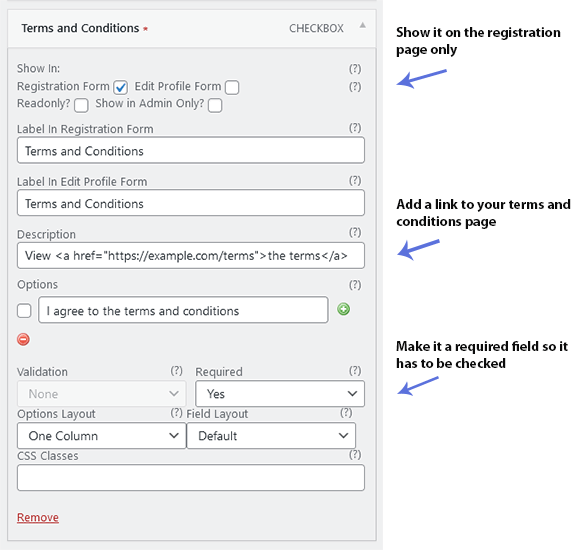
Don’t use HTML in the actual checkbox option label. Instead, use the HTML code in the “Description” area of the checkbox field.

See the following screenshot that show an example of how you can create a simple “terms and conditions” checkbox for the registration form:
https://www.tipsandtricks-hq.com/wordpress-membership/wp-content/uploads/2021/05/terms-and-conditions-checkbox-configuration.png

Forum Related

  • Forum Home
  • Forum Search
  • Forum Registration
  • Forum Login

Support Related Forms

  • Contact Us
  • Customer Support
  • Request a Plugin Update
  • Request Fresh Download Links

Useful Links

  • Plugin Upgrade Instructions
  • WP eStore Documentation
  • WP eMember Documentation
  • WP Affiliate Platform Documentation
  • Tips and Tricks HQ Home Page
  • Our Projects

Quick Setup Video Tutorials

  • WP eStore Video Tutorial
  • WP eMember Video Tutorial
  • WP Affiliate Platform Video Tutorial
  • Lightbox Ultimate Video Tutorial

Our Other Plugins

  • WP Express Checkout
  • Stripe Payments Plugin
  • Simple Shopping Cart Plugin
  • Simple Download Monitor

Copyright © 2026 | Tips and Tricks HQ